I’ve previously blogged about using Notepad++ to compare two text files but ths plugin functionality has been excluded from its latest update due to “compatibility issues”.
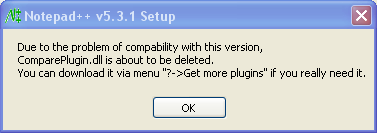
Getting this plugin back into Notepad++ is easy and here’s what you can do.
1. Goto notepad++ plugins donwload page at Sourceforge here
2. Select ComparePlugin from the plugins table and download ComparePluginx.x.x.unicode.zip.
3. Inside the downloaded zip file, you will find the ComparePlugin.dll. Unzip and place this into your Notepad++ plugins directory (which is usually at C:\Program Files\Notepad++\plugins)
4. That’s it. You get to compare your 2 text files in Notepad++ once again 🙂
Update: There’s now an even easier way to get new plugins such as the “compare plugin” installed into Notepad++. Just use the new Notepad++ Plugin Manager introduced since Notepad v5.6.
Klementz says
Thanks, that helped me out.
Chris says
Since the plugin was removed due to “compatibility issues”, I need to ask: Has anyone seen any such compatibility issues after re-installing it?
David says
I personally haven’t seen any so called “compatibility issues” after reinstalling the plugin. I’m also wondering what the “real issue” is…
kh says
This has solved my problem. Thanks.
yihang says
how to change the color of compare result to the color expected ?
I konw the color can be changed by modify the config.ini , but how can i know the value input of expected color
Sanjay says
Go to Plugins >> Compare >> Options
Bruno Leonardo - Brazil. says
Thank YOU a Lot!
Mark Reeder says
Thought this was broken… until I discovered the proxy setting 🙂
Tanya says
Yep. Plug-In Manager shows “nothing available” if the proxy is not set up right.
Aabha says
That helped a lot, many thanks !
Popin says
There is another way to add the compare plugin.
1. Open Notepad ++
2. Go to Plugins -> Plugin Manager -> Show Plugin Manager
3. Under the Available tab, check which plugin you wish to install, then click the Install button.
Kaia says
Merci!!!
Cameron says
Thanks! 🙂
Nina says
Thanks!! That was helpful
notepad++ says
not working for windows 7 – 64 big
alonzo says
thanks, many thanks
Charlie says
not working for win10 x64 version with v7 notepad++
Neha says
Neatly explained. Thanks! It helped me.
shashank says
Thanks for the help. it worked.
Benoît R says
Thank you David, hope you’re doing well 😉
pbs says
I have installed npp 7.5.4 version. Built in Plugin manager is not importing the compare plugin.
v1adimir says
Uh-huh. You wish it were so easy..;) The few articles on this web site are all tied into a loop (some pointing to old solutions, such as the Sourceforge files), but none are linking to the solution – information available via their forum post @https://notepad-plus-plus.org/community/topic/14496/no-plugin-manager
v1adimir says
Yup! Very confusing info hear; I’ve posted a link to their forum topic, if it gets published. Also, the problem may have been related to: 1) your firewall and /or Internet Options (in Windows, that’s what it uses to access – the MHTML engine), or 2) a mismatch between 32-bit and 64-bit versions!! 🙂
ImaUser says
Is there a 64-bit version available?