Gmail allows users to “filter” their incoming mails and apply “labels” on every email that matches the filter’s criteria. That’s good but new users might find it frustrating that labeled emails are still showing in their main inbox reading list. You can hide labeled emails easily by simply doing the following.
Tip: Archive It!
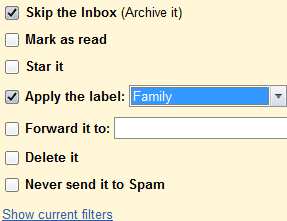
Goto your filter settings and check the “skip the inbox (archive it) setting”. That’s all you need to do.
Now go back to Gmail inbox and enjoy a cleaner and less cluttered reading list.
Konstantin Mirin says
Cool tip!
Hans says
Thanks a lot for this tip!
Washington says
I don’t want to archive it. It would be better if I could just select a label beside of the inbox list. For that reason, I think Google is not very smart.
David says
you can still manually label each email in your gmail inbox
Bob Terrell says
Sooooo, where exactly can I find the filter settings menu shown above?
Bob says
ok so, you go to your gmail (on a computer), hit the settings icon in the top right corner, click on “settings”, click the tab “filters and blocked adresses”, click “create a new filter”, and input the info that you wanted to. The menu you’re looking for comes up after you finally click “create filter with this search” in the bottom right corner. 😀
mehdy says
I have tried everything. The above technique hides the massages and clears up the clutter in the inbox BUT it does NOT hide the same messages that you just hide in the “multibox” environment. In other words messages and labels that you archive disappear from inbox but they still remain in other boxes you have created. so What is the point?? I have created multi boxes to separate and direct my incoming emails to let say 5 boxes(i have 5 email different addresses). Emails sent to my email address one go into box one, emails sent to my email address 2 go in my box number 2 so on and so on. Besides the 5 boxes I have created, gmail shows the sixth box that contains absolutely all email sent to all of my 5 different email address(basically it is a black hole with every email dumped into it). Black hole inbox works as box that keeps duplicate of all emails.
So when hiding (or archiving) a label, all emails under that lable disappear from the “black hole dump box” but they still remain and clutter in respective 5 other boxes I have created. So it it useless unless you are navigating in the general black hole dump box called “inbox” for your emails. This basically renders creating multi boxes useless. What is the point if one can not hide and archive messages in other boxes other that “inbox”.
Maybe I am missing something but I have been at it for 2 days now trying to figure this beast out. I have searched goole for an answer but have not come across someone who has even addressed this issue in multi box environment.
Thank you.
David says
I guess it depends on how you want to use it.
In my case, I create labels (what you call inboxes) which stores “filtered” emails. It is up to you how to define the filter (by subject, sender, keyword etc) and you can also make each email that matches the filter to be always marked as read/archived/trash.
My “filtered/labeled” emails are stuff like newsletter (per industry/sender/subject) which I might want to read sometime but not really urgent that needs to clutter the inbox (your so called black hole). The way i see it is that important emails are usually those which can’t be filtered. Those that can be filtered are thus given a label by filters, and what’s left in inbox are the real important stuff.
Hope that helps.
Makate says
Just click on the small downward-facing arrow next to the label and click Hide. The emails attached to the label will be hidden. If you want to assign emails to a label as and when you receive them, do this: 1. Open the email. 2. Click on More – Filter Messages Like These – Create Filter with this search – Click Apply the Label (and select the Label from the list) – Before you click Apply Filter be sure to also Check the: Also apply filter to ‘x’ matching conversations.
v1adimir says
Google is HORRIBLE and in the years since gMail has started they’ve done nothing to improve the user experience; lots of “useful” Labs features, LoL
*Yeah, sure, everything can be configured – more, or less – however, why not just provide a normal, working, (classic!) email; that ALSO has “cname” & everything else, just like Google.
^^ Because it IS all, just, SMTP
(Just stating the obvious and how they only push their agendas. It’s crazy, where they’d been among the first to offer completely free POP3 and IMAP, they’ve not strayed very far from their primary purpose of surveillance and intelligence. :))
Greg Schaffer says
Not all heroes wear capes. While you posted it ten years ago, I just hit maximum frustration today. Hopefully it still works well – thank you.
Ajith says
Very useful. Thanks for sorting it out.
Walter Fizzro says
Unfortunately it doesn’t work for my inbox, labelled messages still appear in the inbox despite having switched on the archive option. Already asked on the Google support forum where the issue is located
Han says
Many thanks!
Joe says
thanks, This was helpful