Also known as user agent spoofing, here are 2 ways to fake Opera’s user agent string so that it will identify itself as Internet Explorer or Firefox. There are some sites which are made only for Internet Explorer or simply don’t support Opera yet and stop loading when you visit. This annoys me sometimes since Opera is my default browser.
1. Quick Preferences
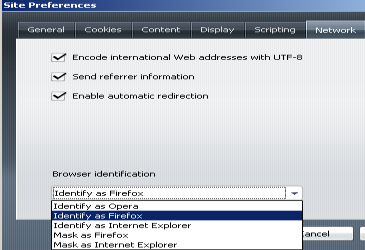
Goto Tools > Quick Preferences > Edit Site Preferences > Network Tab > Browser Identification
There are 5 options where you can choose from:
1 = Identify as Opera
2 = Identify as Firefox
3 = Identify as Internet Explorer
4 = Mask as Firefox (Opera not mentioned in user agent string)
5 = Mask as Internet Explorer (Opera not mentioned in user agent string)
2. opera:config
– Type opera:config in the Opera address bar and press ENTER
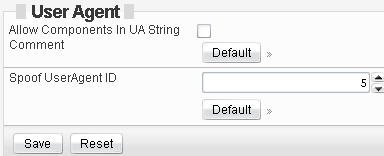
– Type Spoof UserAgent ID in the text-box next to Show All
– Change the “Spoof User Agent ID to any one of these supported user agent string:
Again, there are only 5 options. Enter a number from 1 to 5 (refer to the list above), and press save.
As you can see, you can spoof Opera user agent string easily using either one of the method above. Note that there is currently no Safari or Chrome user agent spoofing in Opera yet since Internet Explorer and Firefox are understandably the 2 internet browsers with the largest users worldwide.
Ali says
nice post, thats right there are some sites which don’t open using opera but then there is IE and Firefox installed in all my systems to deal with them. therefore my opera always identifies itself as opera for it’s user base to show growth! 🙂
David says
Great to hear from an Opera lover! 🙂
Rafael says
“Note that there is currently no Safari or Chrome user agent spoofing in Opera yet since Internet Explorer and Firefox are understandably the 2 internet browsers with the largest users worldwide.”
That’s not true.
The real reason is that this identify / mask feature is to solve browser sniffing bugs websites causes in Opera. There’s no need for Chrome or Safari for this thing, identifying as IE or Firefox might make the website work correctly, it’s enough.
That’s the reason. 🙂
Faction says
thank you sir. Love opera and hate everything else. No i have no further need to use anything else.
David says
chrome and opera is all i’m using these days
Ayn says
wow thank you so much!!! great help!
DavidQ says
I must work with a site that wants IE 8 or OLDER! Problem is Opera 11.5+ spoofs IE9. Is there anyway to have Opera latest Opera spoof IE8 instead?
Chris C says
When is Opera going to allow CUSTOM user agent strings? I’ve been waiting for YEARS for this improvement… Why the restriction to a limited set of browsers?
PM says
There’s a better way: you can set any UserAgent string by typing:
opera:config#UserPrefs|CustomUser-Agent
in your address field