 Here are ways that you can convert dmg files to iso files on Mac OSX, Windows and Linux.
Before we start, let’s download a dmg file from the public domain. I found one on Apple’s article about The XMLHttpRequest Object website while I was learning Ajax and that can be downloaded from this link. This is just a 150KB dmg file and will be handy if you want to have something to test with while you’re following this tutorial.
How To Convert DMG Files To ISO Files On MacMethod 1: Using the Mac terminal
1. Open a terminal window from Finder > Applications > Utilities > Terminal.
2. Assuming that you have a disk image called apple.dmg in the current directory, type
hdiutil convert apple.dmg -format UDTO -o apple.iso
3. This will actually create a file called image.iso.cdr in the current directory (even though we asked for the output to be image.iso). This file can be safely renamed to image.iso, copied to a Windows server or machine, and burned with your CD/DVD burner of choice.
Generally, the command hdiutil can be used this way:
hdiutil convert /path/to/filename.dmg -format UDTO -o /path/to/savefile.iso
Method 2: Using DMGConverter (freeware)
1. DMGConverter is a disk image (.dmg, .cdr, .iso) creation and conversion tool which is simple and easy to use. It is a very useful tool for the collective processing of more than one file and every folder, and it can deal with all the fundamental processing with the drag & drop of the file/folder. For Mac Only.
How To Convert DMG Files To ISO Files On Windows
This is for Windows users who might have downloaded a dmg file and wondering how to extract the content, or not even knowing how and what to do with the dmg file. I’ve been there at a certain stage. the sharewares mentioned are fully functional and allows you to use the “convert dmg to iso” function even when it’s not registered yet.
Method 1: Using MagicISO (shareware)
1. Download MagicISO, install and run program.
2. Click  to open dmg file.
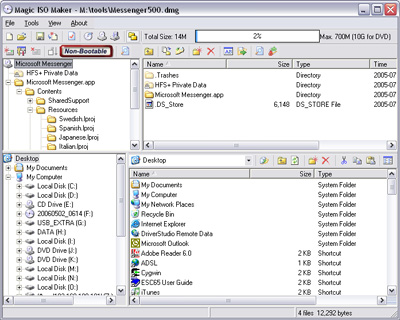
3. Click  to open “Properties” dialogs.
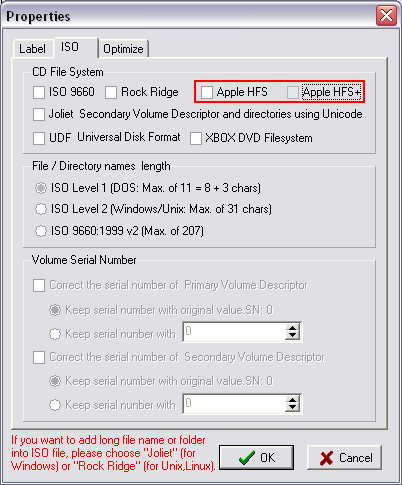
4. Uncheck Apple HFS and Apple HFS+
5. Check “ISO 9660” “Joliet” “UDF”
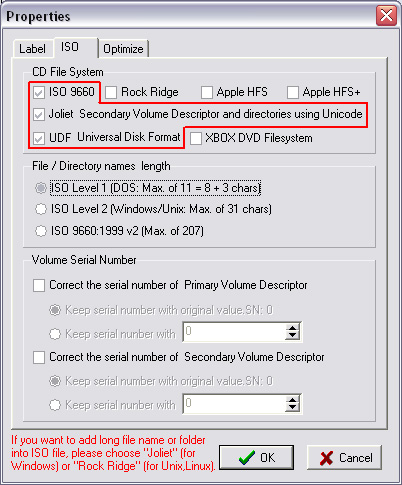
6. Click OK
7. Click  to save as to iso image, or click
  to burn to CD/DVD without saving.
Method 2: Using UltraISO (shareware)
UltraISO basically does the same thing, but it can save you time from doing step 3 to 6 compared to method 1.
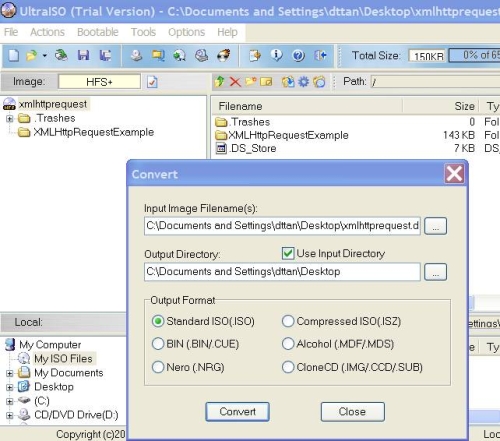
Alternative Solutions: dmg2iso (freeware) and isobuster (shareware)
I’ve heard and read that some people had been able to convert dmg files into iso files using dmg2iso (freeware). I’ve tried dmg2iso, converted my dmg file to iso without problem, but the converted iso file is corrupted and can’t be open by any tools (Daemon Tools, Alcohol, MagicISO, UltraISO and ISOBuster) that I’ve tested. It might work for you, but no guarantees.
ISOBuster is pretty similar to MagicISO and UltraISO. But too bad that the function to “convert dmg to iso” is restricted and won’t be functional until you buy the software.
How To Convert DMG Files To ISO Files On Linux
Free open-source app AcetoneISO provides a great deal of disc image manipulation tools not found in the Gnome desktop. It can mount/unmount a variety of image formats (ISO, DMG, MDF, NRG, BIN, NRG), convert images, create, encrypt, and decrypt ISOs, play DVDs (with the required codecs installed), and much more. It is particularly useful for mounting proprietary formats found in Windows and Mac boot discs. AcetoneISO is a one-stop-shop for all of your CD/DVD image manipulation needs, and is a free download for Linux only. This works on all famous linux distro such as Ubuntu, SUSE, Fedora, Mandrake, and Redhat.
So there you have it, and this should get you covered no matter what operating system you’re using.
Alan says
I have windows XP, im instal UltraIso and convert dmg to iso no problem. Thank you
Maddy says
Hello, I tried to convert the dmg image to an iso but none of the softwares are able to recognize the iso image as a good file. It says the disk is corrupt. May be that apple has put a stop to this ?. I tried this on the latest iphone sdk build 9M2621a. Could you please let me know if there is a way to figure this out ?
David says
Could it be that your dmg file is corrupted at the first place?
Alok Jain says
Ultra ISO is best!!
I tried all stuff…magiciso,dmg2iso…etc.etc but Ultra ISO is the best..
Just open the DMG file and convert it to ISO and den burn it on a Dual Layer DVD..thats it…
Thanks David for such a wonderful article
jaison says
are you using linux ubuntu) or windows or mac jain?
Meggy says
Hey, can you do this with nrg files too?
David says
Hey Meggy, do you mean convert .nrg to .iso or convert .dmg to .nrg?
Zedeck says
Confirmed! UltraISO is the best among all of these tools on Windows to convert DMG files.
I have tried, IsoBuster and MagicISO. Both have failed to recognize the DMG as a valid image.
Klau says
This is a nice one. I´ve encountered this post several times this week searching for something alike. Now is in my mail box 🙂 Keep up the great work!
Marshall says
I purchased UltraIso. Some tips when purchasing/using this software.
1) Do NOT OPEN a dmg file to convert.
2) DO use “tools/convert” to open DMG
3). Then, simply hit the convert button.
Browse to your destination folder (Default is the same one your dmg is in) and u will find a perfectly converted ISo file.
Hope this helps. UltraIso is also great for “all things ISO, like opening, updating and creating bootable burned ISO files as well.
salim says
I’ve an application that works only on Mac, I’ve downloaded it then converted it to iso thanks to ultra iso. When I tried to install it or run it I couldn’t (on windows).
Could you advise me how to run a Mac software on Windows.
Thanks
David says
an iso is only a disk image file that can be
1. burnt to a disk using cd burners + software or
2. mount it using software such as slysoft virtual clonedrive
i suggest u try option 2. hope that helps
jaison says
can any one say for linux system how to convert dmg to iso please!
fasfafa says
acetoneiso is just a fake. it requires some other files to download manually before it does anything; probably some malware