 To block websites on your home computer without spending lots of money in expensive software, here’s a trick for Windows PC.
Step 1: Click the Start button and select Run. Now type the following text in that Run box:
notepad c:\WINDOWS\system32\drivers\etc\hosts
Step 2: Don’t panic if you see some weired characters when notepad opens up. Simply goto the last line of the file and stat typing the websites that you want to block, each seperated by a line break (ENTER).
127.0.0.1 orkut.com
127.0.0.1 facebook.com
127.0.0.1 myspace.com
127.0.0.1 sex.com
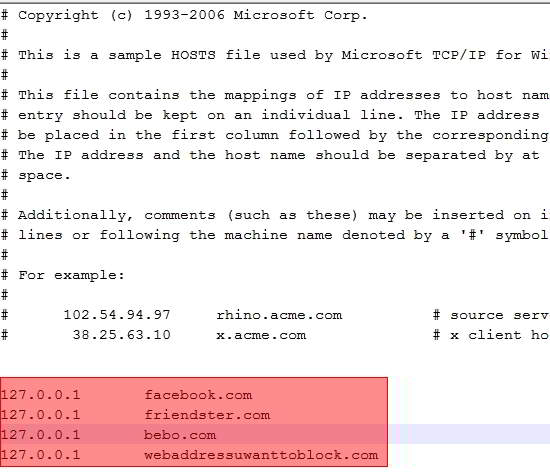
Save the file, exit and you’re done. No one will be able to access those sites that you have just blocked using this method. The good thing is you can keep on listing as many offensive sites you want to be blocked.
How to unblock?
If you want to remove the ban later, open the same file as mentioned in Step 1 and delete the above lines.
taha says
thats works thanks all ho contribute in it i get the way thanks alot
Mahesh says
this works fine …when the page is opened in IE.But if u have the different browsers like Firefox, this does not work
jani says
i think it works on each and every browser
ann says
hi,i’ve tried blocking youporn.com but it still shows up when my son opens it.
abdullah says
thanks a lot but is there a way to block the entire website including all its subdirectories without showing messages like access denied or enter password to get access. I mean the same way HOSTs file work, unable to connect.
Tanks
rajeev says
THANK YOU SO MUCH BUDDY , I REALLY APPRECIATE IT
THANK YOU
THANK YOU
THANK YOU
THANK YOU
THANK YOU
THANK YOU
THANK YOU
THANK YOU
THANK YOU
THANK YOU
!!!!!!!!!!!!!!!!!!
Qaisar says
This is so good it works on all my browsers like internet explorer or fire fox and google chrome
Thanks A lot this was really helpful =D
Qaisar says
hey this works great on all browsers
but don’t forget to add the www. for the websites
e.g.
127.0.0.1 http://www.facebook.com
127.0.0.1 facebook.com
do this so that both formats get blocked i tried this on firefox i dont know about any other browsers but it worked on internet explorer too
This is a great trick
Thanks A lot buddy this was really helpful =D
prdwy says
hey ive edited the file but without www. and saved it.
now i cannot access to the same file from c:\WINDOWS\system32\drivers\etc\hosts it is saying access denied.
plz help me
Zameer says
Do this task by administrator login you must be using user login account that the reason this massage is appearing, or your system administrator restricted for access.
Datta mane says
thanks buddy i have tried it out it worked in all browsers
David says
How to block all site except gmail ?
kenan says
like i cant save it man
David says
Kenan, you might want to read the comments in this post http://www.davidtan.org/simple-trick-to-block-websites-in-windows/ , hope that helps.
earl crichton says
this is dumb! why can’t i block facebook.com?
David says
Yes, you can block whatever website you want to. Are other websites (listed in hosts) blocked successfully and is it only facebook.com that can’t be blocked?
mike says
but it can be access by using some websites unblocker………. do you have any solution for this thanks.!
David says
I would like to know what do you mean by “websites unblocker”. Do you have an example? A web proxy hosted by someone on the internet or some kind of software?
If it’s a web proxy, I can see why it’s still accessible and that, I’m afraid, can’t be blocked by using the method mentioned in this article.
If it’s a software installed locally on a computer, then *maybe*, there’s still a way around it.
Aditya says
there is a software named ultrasurf which let u surf blocked sites
Jan says
Thank you – this is excellent!
Aditya says
hey
i m using wifi at my home. whenever projects are given from college my friends come over to my place and use the facebook and don’t work
so, how can i block facebook on my whole wifi network
Greg says
Dont work for me using firefox…bummer
David says
it should, did you follow through? any errors message?
or else, you can try the firefox plugin at http://www.davidtan.org/increase-productivity-by-blocking-time-wasting-websites-in-firefox/
i say says
U ARE AWESOME
Muhammad Asim says
# Copyright (c) 1993-1999 Microsoft Corp.
#
# This is a sample HOSTS file used by Microsoft TCP/IP for Windows.
#
# This file contains the mappings of IP addresses to host names. Each
# entry should be kept on an individual line. The IP address should
# be placed in the first column followed by the corresponding host name.
# The IP address and the host name should be separated by at least one
# space.
#
# Additionally, comments (such as these) may be inserted on individual
# lines or following the machine name denoted by a ‘#’ symbol.
#
# For example:
#
# 102.54.94.97 rhino.acme.com # source server
# 38.25.63.10 x.acme.com # x client host
127.0.0.1 localhost
127.0.0.1 http://www.facebook.com
127.0.0.1 facebook.com
i add this line but the facebook still open
David says
seriously? did u save it to the right place?
E says
I’m having the same problem as Muhammad
anil says
than u vcery much
but i want to block some website on whole my network not only one computer is there any idea to block in my entire network with
MIKE says
One problem… I can’t seem to save the file. I hit save and a sort of error message pops up and says “can not save the file. Make sure the path and file name are correct. Then a window pops up letting me save it as a regular file somewhere on my computer. I did that, and the sites were still working. Any help?
David says
Your question has already been answered. Please read through the comments.
kinven says
this way will only half work since it is only blocking facebook.com and you can still get to facebook by going to login.facebook.com so best solution is to block facebook.com/home.php? also
and to block it from your entire network you have to block it in your router and if you cant figure out how to do it go buy a netgear they make everything clickable
for problems saveing (vista) run notepad as administrator
to do this navigate to notepad (start\all programs\accessories\notepad but right click it and run as administrator then navigate to c:\WINDOWS\system32\drivers\etc\ make sure when you get there you change the file types your trying to open from *.txt to all files then edit your hosts file useing the above method and save
problems saveing (windows 7) in this vershion of windows it is an ownership problem with a quick fix http://www.blogsdna.com/2173/add-take-ownership-option-in-right-click-context-menu-of-windows-7.htm
download the file and taking ownership is a right clickable option
again edit useing the above method and save
jani says
what is a net gear? could u tell me how to block sites of entire network? we have ZTE zxdsl 831 II series router..
ursJAR says
You are not administrator account holder .. thats why that message.
First run notepad in admin mode and open the file from notepad .. it will work =)
Merrill Chwalek says
Very good content thanks for posting. I will deffinately come back here again shortly.
nortel says
I did as you said but when I try to save it saves in text file. seems like it has protection on the file to modify or change. My os is Win 7. how can I get it saved?
florence says
dont work for me using chrome web browser
David says
it should work regardless of which browser you’re using.
Have you tried other browsers such as internet explorer, firefox, opera or safari?
dante says
i can’t block facebook website.grrrrrrrrrrr!
David says
You might be doing something wrong, try again 🙂
Kaushal says
i use internet through proxy server and your method to block facebook is not working on my comp, please help…
Berto Putik says
Thanks! Now facebook is blocked from my computer.
this is what I did
127.0.0.1 localhost
127.0.0.1 www . facebook . com
127.0.0.1 facebook.com
127.0.0.1 www . friendster . com
127.0.0.1 friendster.com
Berto Putik says
and also..
ber sure not to forget this
login.facebook.com
Joe says
I have two browsers IE and FF, this only blocks it on IE not FF :{
David says
That can’t be true, it should work on any browsers.
G says
Thanks for the great information. When I get home from work I am going to try this on all of our computers. How would I blook facebook from an IPAD?
David says
Good question. I haven’t tried doing this on iPad but I’ll find out soon, stay tune.
Mike Ryan says
Please help, i have about 20 computers on my net work, i want to block all unwanted websites i.e facebook, youtube, redtube etc etc, i have linksys router on which i’ve blocked some sites but can’t do them all. I am using RedHat Enterprise Linuc 5 server, don’t have no ISA set up at the moment, what can i do to block all the unwanted websites on my user computers??? one more question is it possible to block 15 computers only on my network not the entire 20 computers? Please HELP….
derrick says
I tryed but is not working? Any ideas why, I did it exactly how is described.
Please help!
Thanks
asher says
In order to block all unwanted websites on the network u have to configure ISA Server
chura says
thanks it works…
kn says
make sure u DONT save file as hosts.txt but just as hosts
asd says
Thanks a lot ….
It works gr8.
ava says
hi it works well but the sites i blocked can still be accessed via google cache.
how can i prevent this?
anyone help me with this…
David says
Good point there. I haven’t actually thought about that before.
Do you know what’s the url of google cache for the website you’re trying to block?
Let me know and I’ll see if i can spot a pattern.
Stalin says
Thank you very much!
Dana says
Is there a way to do this on a Mac?
Anish says
hiee!! i know how to block sites but i want to knw how to save it
its not being saved
David says
This is already answered in the comments
subash says
first time it worked but,,,
when i did it the second time…it fails…
i dont know…why..????
David says
recheck the hosts file and see if the sites you’re trying to block are still there
Aaron Brown says
This is GREAT! I just used it to block Reddit so I’m more productive at home. Thanks for posting this 🙂
Have you thought of updating this post to include solutions provided by the comments?
David says
Hi Aaron, you’re welcome.
I can update it if i know what’s left out in the post. Do you mean the UAC part or…?